# PowerShell 7.4 and 7.5 Retire on November 10
A short public service announcement: **PowerShell 7.4 (LTS) and PowerShell 7.5 both reach end of support on November 10, 2026.** That's less than two weeks from now, and as far as I can find there's no PowerShell team blog post reminding anyone. So here's one.
This also gets a mention in the [Q3 roundup](/2026-10-30-powershell-roundup-summer/), but it's the kind of date that deserves its own post.
## Why both on the same day
PowerShell's support follows the .NET version it's built on ([support lifecycle](https://learn.microsoft.com/en-us/powershell/scripting/install/powershell-support-lifecycle)):
| Version | Built on | End of support |
|---|---|---|
| PowerShell 7.4 (LTS) | .NET 8 | November 10, 2026 |
| PowerShell 7.5 | .NET 9 | November 10, 2026 |
| PowerShell 7.6 (LTS) | .NET 10 | November 14, 2028 |
.NET 8 is an LTS release that gets three years. .NET 9 is a short-term (STS) release, which used to get 18 months — but Microsoft extended STS support to 24 months, so .NET 9 now ends on the [same day as .NET 8](https://dotnet.microsoft.com/en-us/platform/support/policy/dotnet-core). PowerShell 7.5 inherits that date.
The result: if you're on anything older than 7.6, you're out of support after November 10. No more security fixes for 7.4 or 7.5.
## What "end of support" means in practice
Nothing stops working on November 11. Your scripts keep running, `pwsh` keeps starting. What stops is servicing: no more patches for PowerShell itself, and no more patches for the .NET runtime underneath it. Given how many of the 2026 servicing releases were .NET updates (the [October 13 wave](https://github.com/PowerShell/PowerShell/releases) was released the same day as the October .NET security patches, and the October 25 wave — 7.6.9, 7.5.13 and 7.4.22 — was nothing but a .NET SDK update), that's not a theoretical risk.
## Where 7.4 tends to hide
The obvious place is your own workstation, but that's also the easiest to fix. The places I'd check:
- **Azure Functions** — PowerShell 7.4 support in Functions [also ends November 10](https://azure.microsoft.com/updates?id=572770), and [PowerShell 7.6 is GA](https://azure.microsoft.com/updates?id=572219) since September 21. The language version is a setting on the function app, so it's usually an easy change — but test it before you flip it. One exception: function apps on the Linux Consumption plan have to move to Flex Consumption before they can use 7.6. (If you're new to Functions, my [first function app post](/2025-02-09-play-around-with-your-first-function-app/) covers the basics.)
- **Azure Automation** — [PowerShell 7.6 runbooks are GA](https://azure.microsoft.com/updates?id=568102) since July 30, and the 7.1 and 7.2 runtimes [were retired on September 30](https://azure.microsoft.com/updates?id=567556). If you still have runbooks on an old runtime, they need moving.
- **Self-hosted build agents** — pinned PowerShell versions in agent images, Dockerfiles and setup scripts. Microsoft-hosted agents get updated for you; your own images don't.
- **Servers and jump boxes** — installed once with an MSI years ago and never touched again.
- **Containers** — base images like `mcr.microsoft.com/powershell:7.4-*` pinned in a Dockerfile.
## Checking what you're running
On a single machine:
```powershell
$PSVersionTable.PSVersion
```
```text
Major Minor Patch PreReleaseLabel BuildLabel
----- ----- ----- --------------- ----------
7 6 9
```
Across servers, assuming you have PowerShell remoting (see my [remoting posts](/tags/remoting/) if not). It looks up `pwsh` on each machine's `PATH`, and replace the server names with your own:
```powershell
Invoke-Command -ComputerName 'server01', 'server02' -ScriptBlock {
$pwsh = Get-Command -Name pwsh -ErrorAction SilentlyContinue
[pscustomobject]@{
Version = if ($pwsh) { $pwsh.Version } else { 'not installed' }
Path = $pwsh.Source
}
}
```
For Azure Functions, the PowerShell version is in the site configuration:
```powershell
Get-AzFunctionApp | Select-Object Name, ResourceGroupName, Runtime, @{ Name = 'PowerShellVersion'; Expression = { $_.SiteConfig.PowerShellVersion } }
```
```text
WARNING: *******************************************************************************************
* This cmdlet will undergo a breaking change in Az v16.0.0, to be released on May 2026. *
* At least one change applies to this cmdlet. *
* See all possible breaking changes at https://go.microsoft.com/fwlink/?linkid=2333486 *
*******************************************************************************************
WARNING: App settings have been redacted. Use the Get-AzFunctionAppSetting cmdlet to view them.
Name ResourceGroupName Runtime PowerShellVersion
---- ----------------- ------- -----------------
func-alert-classifier-prod rg-alert-processing PowerShell 7.4
```
## Upgrading a function app
If your function app is on 7.4, the portal already tells you. On the function app's **Overview**, the **Notifications** tab shows a "Functions runtime stack version deprecation" warning:
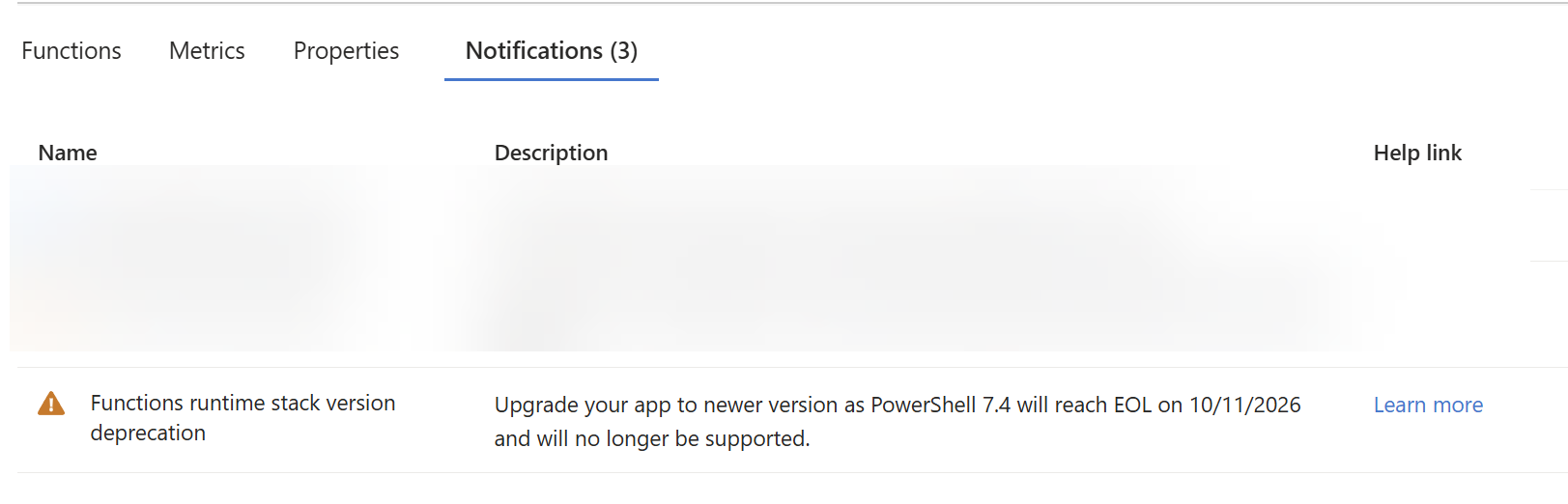 (The date is in my portal's day/month format: 10/11/2026 is November 10.)
The place to actually change it is **Settings** > **Configuration** > **Stack settings**, which shows the same warning right under the version:
(The date is in my portal's day/month format: 10/11/2026 is November 10.)
The place to actually change it is **Settings** > **Configuration** > **Stack settings**, which shows the same warning right under the version:
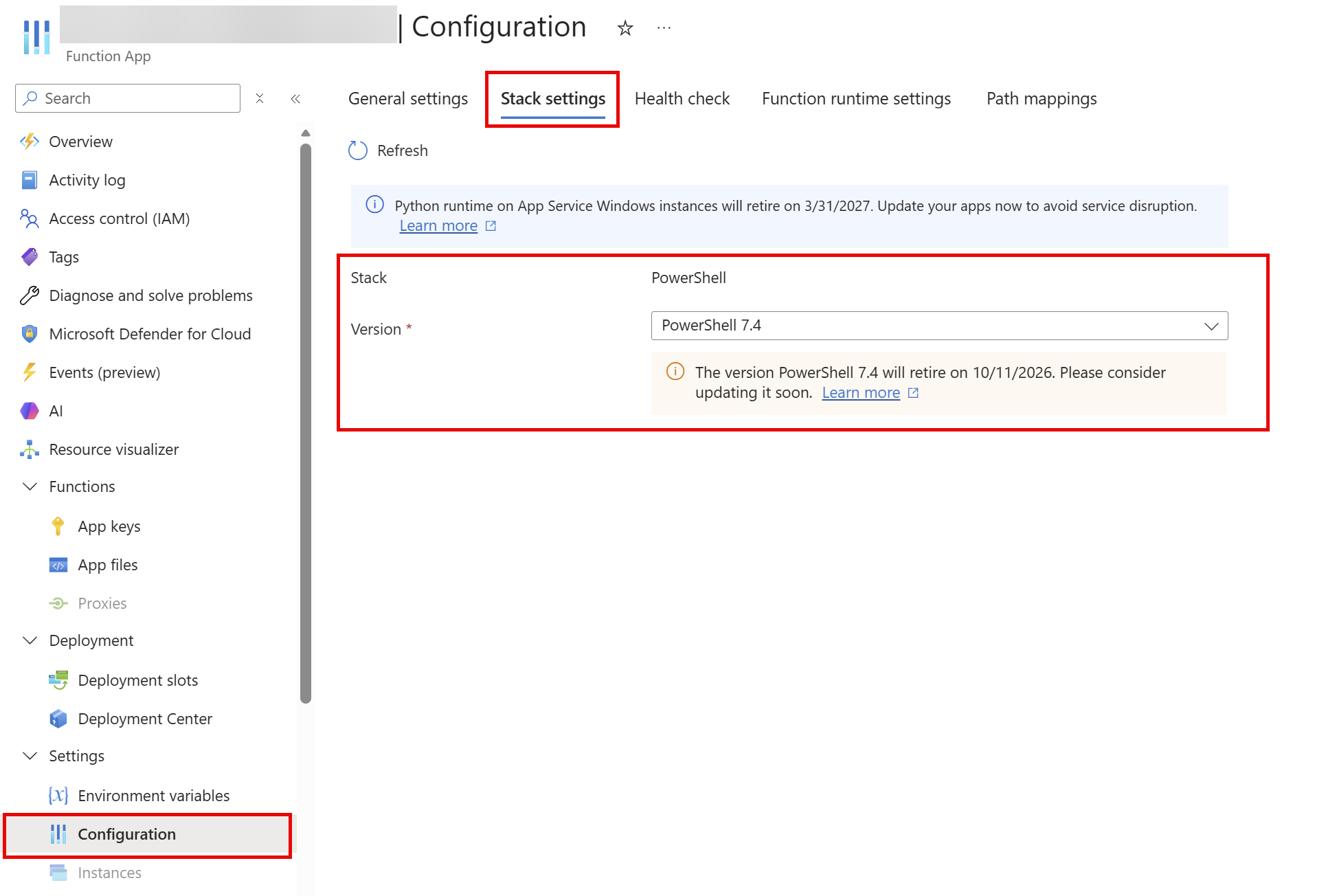 Select **PowerShell 7.6** as the version and select **Apply**. It's updated within seconds:
 Microsoft's [guide to updating the language version](https://learn.microsoft.com/en-us/azure/azure-functions/update-language-versions?tabs=azure-portal%2Cwindows&pivots=programming-language-powershell#move-to-the-latest-functions-runtime) covers the details, including the Azure CLI route, testing in a deployment slot first, and verifying the update afterwards. Remember the exception from above: on the Linux Consumption plan you have to move to Flex Consumption before 7.6 is available.
## Upgrading Automation runbooks
In Azure Automation, the PowerShell version a runbook runs on comes from its **runtime environment**. So the upgrade is two steps: create a runtime environment for 7.6, then point your runbooks at it.
**1. Create the runtime environment.** In the Automation account, go to **Process Automation** > **Runtime Environments** and create a new one. Give it a name, select **PowerShell** as the language and **7.6** as the runtime version:
Microsoft's [guide to updating the language version](https://learn.microsoft.com/en-us/azure/azure-functions/update-language-versions?tabs=azure-portal%2Cwindows&pivots=programming-language-powershell#move-to-the-latest-functions-runtime) covers the details, including the Azure CLI route, testing in a deployment slot first, and verifying the update afterwards. Remember the exception from above: on the Linux Consumption plan you have to move to Flex Consumption before 7.6 is available.
## Upgrading Automation runbooks
In Azure Automation, the PowerShell version a runbook runs on comes from its **runtime environment**. So the upgrade is two steps: create a runtime environment for 7.6, then point your runbooks at it.
**1. Create the runtime environment.** In the Automation account, go to **Process Automation** > **Runtime Environments** and create a new one. Give it a name, select **PowerShell** as the language and **7.6** as the runtime version:
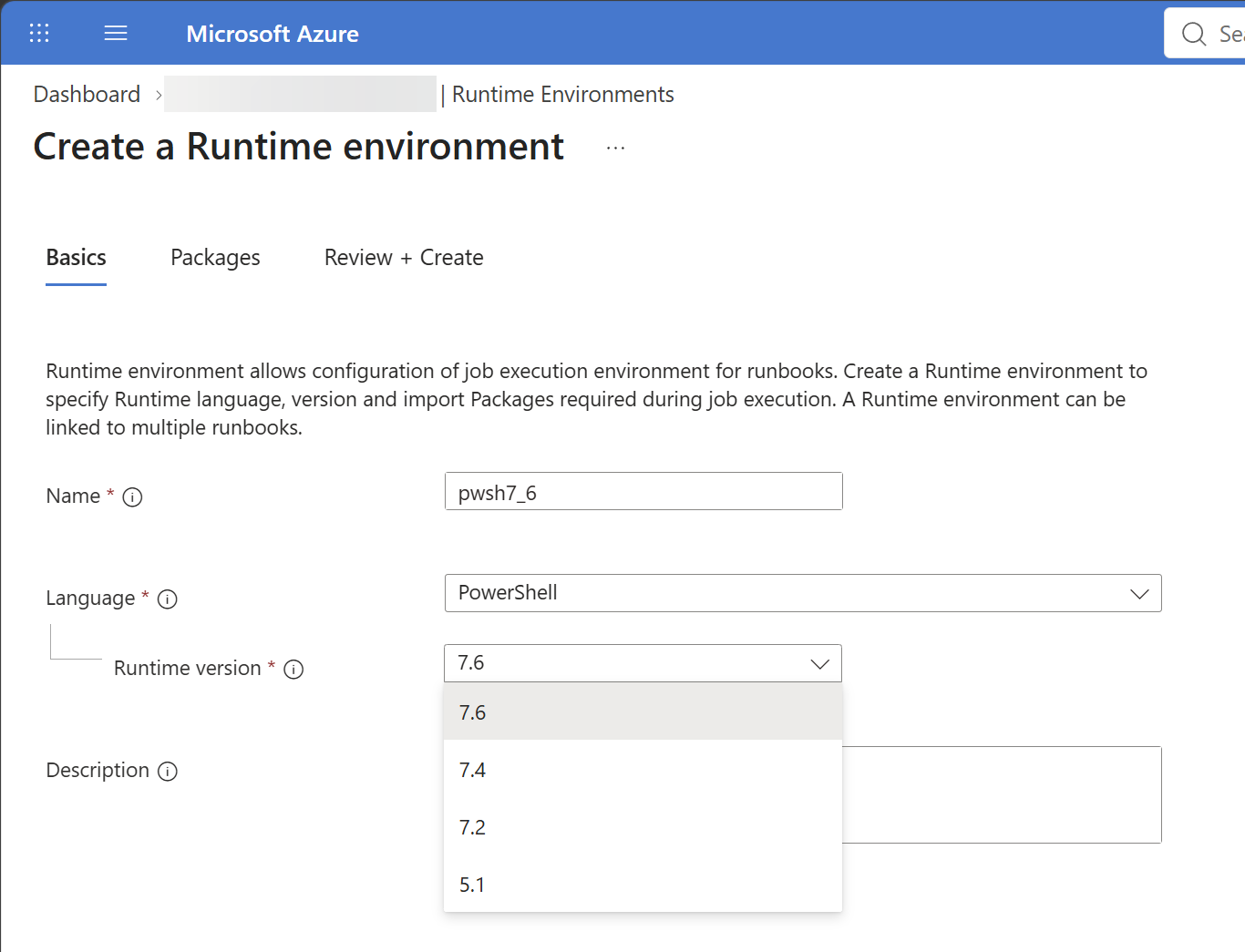 On the **Packages** tab, add the modules your runbooks need. The easiest way: look at the packages in the runtime environment your runbooks use now, and add the same ones. Then **Review + Create**. Creating the environment takes a few minutes, until you get the notification that it was created:
 **2. Update the runbooks.** Once the environment is ready, go to **Runbooks**. The **Runtime environment** column shows which runbooks are still on an old one — in my case, a list of runbooks still on PowerShell 7.2. Select them, choose **Update Runtime Environment**, and pick the environment you just created:
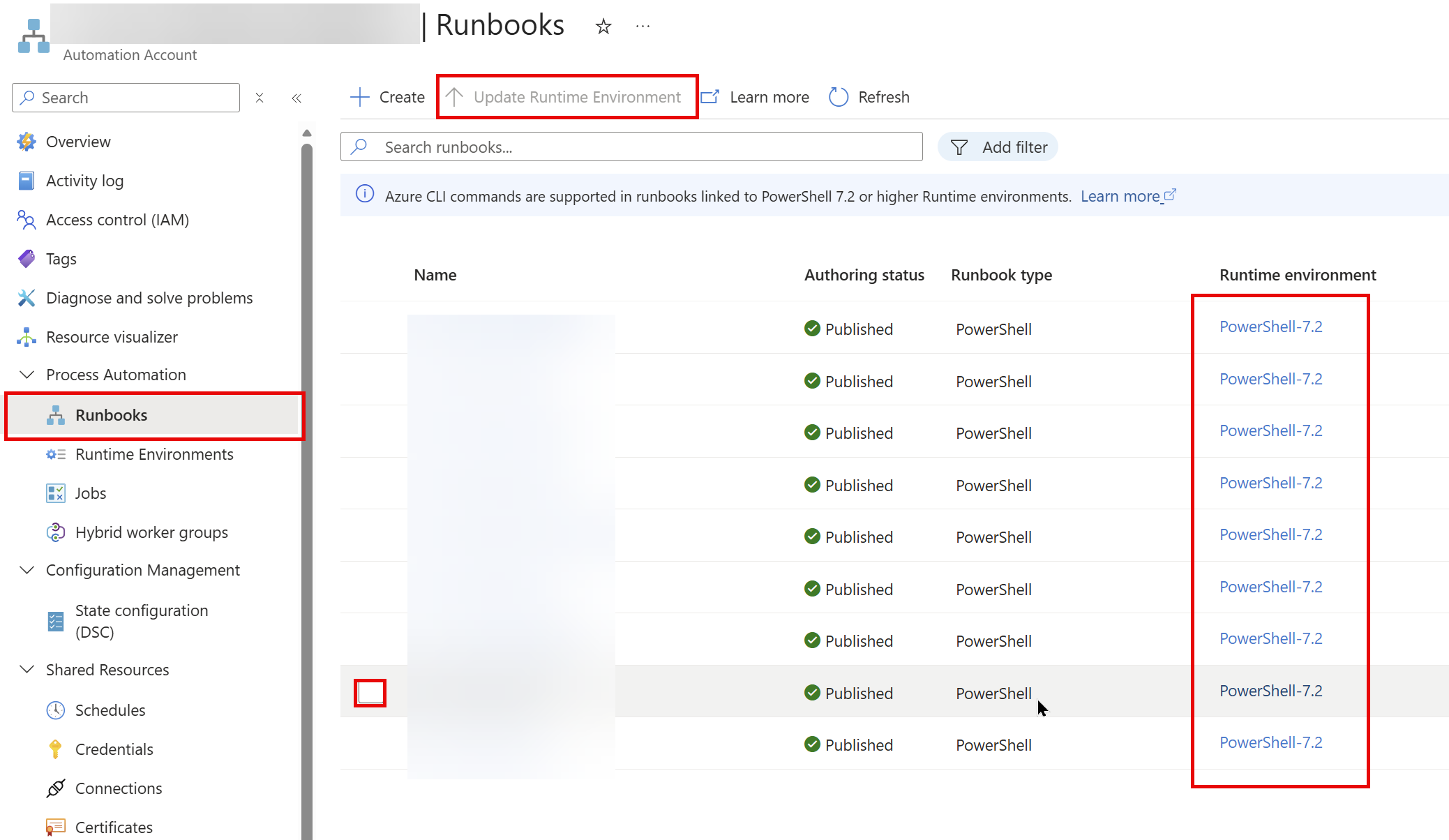 And that should do the trick. As with any version change, run each runbook once (or test it first) before you rely on its schedule.
## Moving to 7.6
For most scripts, 7.4 to 7.6 is uneventful. The [What's new in PowerShell 7.6](/2026-03-16-whats-new-in-powershell-76/) post covers the changes, and the [7.5](https://learn.microsoft.com/en-us/powershell/scripting/whats-new/what-s-new-in-powershell-75) and [7.6](https://learn.microsoft.com/en-us/powershell/scripting/whats-new/what-s-new-in-powershell-76) release notes on Learn list the breaking changes. Run your Pester tests on 7.6 before you switch production over — and if you don't have Pester tests yet, this is as good a reason as any to [start](/2025-06-02-getting-started-with-pester/).
And don't wait for 7.7, even though its first release candidate came out this week: it's built on .NET 11, which is an STS release, so 7.7 won't be an LTS version. 7.6 is the one to be on until November 2028.
As for me: I found exactly what this post warns about in my own subscriptions — a function app still on 7.4, and a set of runbooks still on PowerShell 7.2. The steps above are how I moved them to 7.6.
Happy scripting 😊
And that should do the trick. As with any version change, run each runbook once (or test it first) before you rely on its schedule.
## Moving to 7.6
For most scripts, 7.4 to 7.6 is uneventful. The [What's new in PowerShell 7.6](/2026-03-16-whats-new-in-powershell-76/) post covers the changes, and the [7.5](https://learn.microsoft.com/en-us/powershell/scripting/whats-new/what-s-new-in-powershell-75) and [7.6](https://learn.microsoft.com/en-us/powershell/scripting/whats-new/what-s-new-in-powershell-76) release notes on Learn list the breaking changes. Run your Pester tests on 7.6 before you switch production over — and if you don't have Pester tests yet, this is as good a reason as any to [start](/2025-06-02-getting-started-with-pester/).
And don't wait for 7.7, even though its first release candidate came out this week: it's built on .NET 11, which is an STS release, so 7.7 won't be an LTS version. 7.6 is the one to be on until November 2028.
As for me: I found exactly what this post warns about in my own subscriptions — a function app still on 7.4, and a set of runbooks still on PowerShell 7.2. The steps above are how I moved them to 7.6.
Happy scripting 😊